

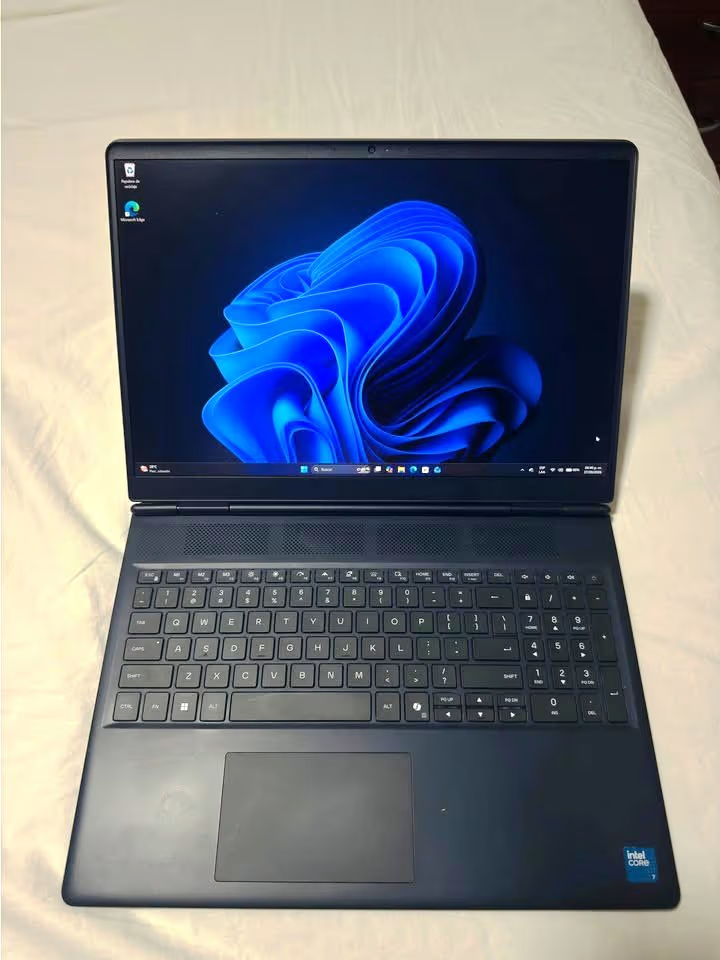
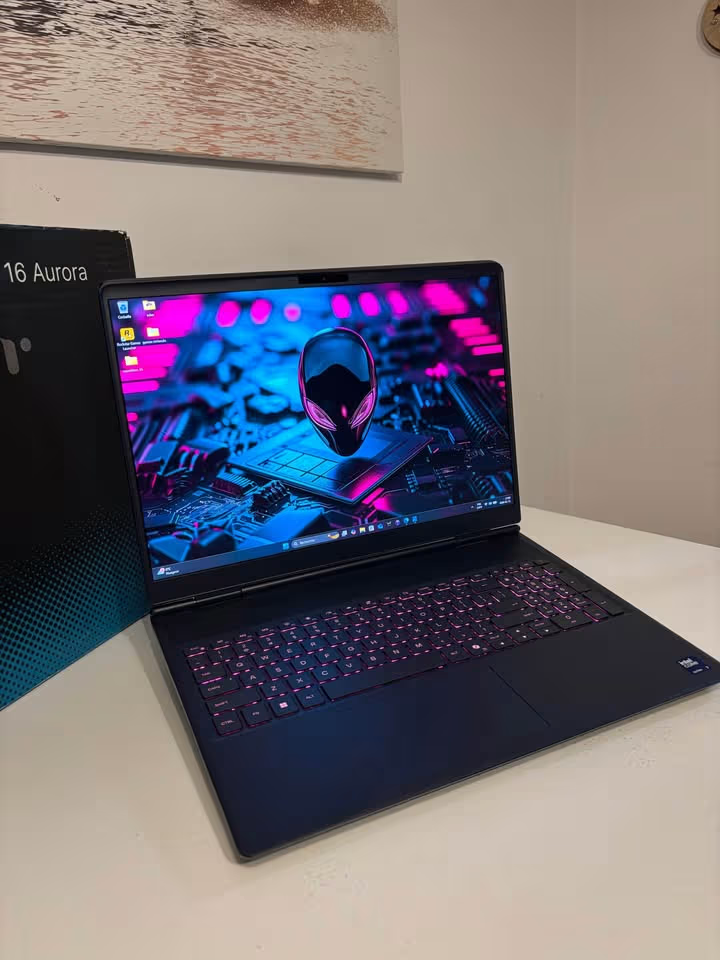
- The build quality is very much excellent, having premium but understated look which is suiting for both gaming purpose and also professional environment.
- CPU performance came strong, because the 10-core Intel Core 7 240H processor is boosting up to 5.2 GHz
- The 16″ WQXGA 120Hz display is quite impressive one, giving 100% sRGB coverage together with 300 nits of brightness
- Display response time is on slower side, so ghosting is becoming noticeable when you play fast type of games.
- Under the continuous heavy load, the CPU thermals run on warmer side
The Alienware 16 Aurora AC16250 is one 16″ gaming laptop which runs on Intel Core 7 240H processor, NVIDIA GeForce RTX 5050 8GB GDDR7 graphics, 16GB DDR5 RAM and also 1TB SSD inside. Basically it is more refined kind of version from the Dell’s mainstream gaming lineup, and it is offering the design and performance of premium-tier level.
This Alienware 16 Aurora came only in single configuration for this price point – the Interstellar Blue colour, with the WQXGA 120Hz display.
The build quality of this laptop is very strong, and the design is notably understated one, which is not so common for a gaming machine.
When we did our performance testing, this laptop is scoring 7.8 out of 10 overall, so it is ranking in top 38% from all the gaming laptops we tested till now. But if we are looking only on the RTX 5050 laptops, then this rank is going up to top 22% of all RTX 5050 gaming laptops tested till date.
The Alienware 16 Aurora is priced around ₹1.6 Lakh for this Core 7 240H/RTX 5050 configuration, which as told is 33% more than segment average. So if your budget is tight one, then the Aurora can feel little bit steep for you, but if you are searching a premium-build RTX 5050 gaming laptop, then it can be good choice also. However, one thing to note – the similarly priced ASUS ROG Strix G16 or the Lenovo Legion 5 configurations are many times giving better performance in the raw gaming benchmarks.
Performance Tests
You can check the full performance table given below to understand how this laptop is ranking:
| Factor | Alienware 16 Aurora | Average |
| Overall Score | 7.8 | 7.5 |
| Price | ₹1.6 Lakh | ₹1.4 Lakh (RTX 5050 segment) |
| Display – Score | 7.5 | 8.0 |
| Display – Resolution | 2560 × 1600 | 1920 × 1200 |
| Display – Refresh Rate | 120 Hz | 144 Hz |
| Display – Response Time | 14–30 ms | 5–8 ms |
| Display – Color Gamut | 100% sRGB | 100% sRGB |
| CPU Performance – Score | 8.5 | 8.0 |
| CPU – Geekbench Single-Core | 2,689 | 2,450 |
| CPU – Geekbench Multi-Core | 13,330 | 12,100 |
| CPU – Core Count | 10 (6P + 4E) | 8 |
| GPU Performance – Score | 7.5 | 7.5 |
| GPU – VRAM | 8 GB GDDR7 | 8 GB GDDR6 |
| GPU – Architecture | Blackwell 2.0 | Mixed |
| GPU – CUDA Cores | 2,560 | 2,560 |
| Thermal Performance – Score | 7.0 | 7.5 |
| Thermal – CPU Max Temp | 96°C | 89°C |
| Thermal – GPU Max Temp | 82°C | 80°C |
| Thermal – Feel | Warm | Moderate |
| Build Quality – Score | 9.0 | 7.8 |
| Build – Weight | 2.49 kg (5.49 lbs) | 2.30 kg |
| Build – Thickness | 19 mm | 22 mm |
| Build – Feel | Premium | Moderate |
| Battery Life – Score | 7.5 | 7.0 |
| Battery – Capacity | 96 Wh | 80 Wh |
| Battery – General Use | 5–7 hours | 4–6 hours |
| Battery – Gaming | 1.5 hours | 1.5 hours |
| Keyboard & Trackpad – Score | 7.0 | 7.8 |
| Keyboard – Type | Membrane | Membrane |
| Keyboard – Backlighting | Single-Zone RGB | Per-Key RGB |
| Trackpad – Feel | Adequate | Good |
| Audio – Score | 7.5 | 7.5 |
| Audio – Speakers | 2× 2W Dolby Audio | 2× 2W |
| Audio – Feel | Good | Good |
| Portability – Score | 7.8 | 7.5 |
| Portability – Dimensions | 357 × 265 × 19 mm | 360 × 270 × 22 mm |
| Company – Score | 8.5 | 8.0 |
| Warranty | 1 Year Onsite | 1 Year Carry-In |
| Support Type | Onsite Service | Carry-In |
How is Alienware 16 Aurora Different?
The Alienware 16 Aurora AC16250 is one 16″ gaming laptop, and its overall performance level is better than the average, but at the same time its price tag is also more than the average – ₹1.6 Lakh for this particular configuration, which is 33% more compared to the average RTX 5050 gaming laptop, so basically the buyer is paying approx. ₹20,000 extra from his pocket.
Advantages
The specific advantages of the Alienware 16 Aurora are including the superior build quality, one higher-resolution WQXGA display, and also very excellent CPU performance. This laptop is having a 10-core Intel Core 7 240H processor with the max boost of 5.2 GHz, and this is helping to remove the bottlenecks, mostly in the multitasking, content creation and also those CPU-bound gaming scenarios.
Neutral Factors
This laptop is having a premium weight of 2.49 kg and one very understated design for a gaming machine. These two things we are considering as “neutral”, because they are more preferential in nature – means different users will be having different opinion about these factors.
Disadvantages
The Alienware 16 Aurora is also having the slower display response times and one worse thermal performance score than the average. In the end, this slow pixel response time of 14–30 ms showed a very dramatic negative impact on the clarity.
| Metric | Value |
| Resolution | 2560 × 1600 (WQXGA) |
| Refresh Rate | 120 Hz |
| Response Time | 14–30 ms |
The laptop came with a 16″ WQXGA IPS panel, and honestly this does give a quite sharp and detailed visual experience. At 2560 × 1600 pixels, the text was looking crisp, games were shown good detail, and the 16:10 aspect ratio is giving you that extra vertical screen space.
In my opinion, the resolution is one of the most strong points of this display, and it is sitting comfortably above the 1920 × 1200 panels that we normally find on most of the competing laptops in this same price segment.
The display covered 100% of the sRGB colour gamut, with a peak brightness of 300 nits. But the outdoor visibility can become a bit challenging when you are in the direct sunlight. The matte anti-glare coating is helping to reduce the reflections, which is a welcome thing to have.
However, the display is suffering from slow black-white and gray-gray response times, which reportedly are ranging somewhere from 14 ms to 30 ms. This is much slower if we compare it with the 5–8 ms average response time that we have seen, based on all of our tests done till today.
CPU Performance Test – 8.5
The Alienware 16 Aurora is giving very good CPU performance. In our testing, we have measured the Geekbench single-core score of 2,689 and the multi-core score of 13,330. This single-core number is around 10% more higher than the segment average of 2,450, which we calculate from all our tests till date.
The laptop is taking advantage from the 10-core Intel Core 7 240H processor, that is having 6 Performance-cores and 4 Efficient-cores, with the maximum boost clock of 5.2 GHz.
| Metric | Value |
| Single-Core Score | 2,689 |
| Multi-Core Score | 13,330 |
This mixing of core architecture together with the clock speed is giving strong result in both the single-threaded and also multi-threaded type of workloads.
The same level of CPU performance you can also see documented in the benchmark data given below.
The 10-core and 16-thread configuration is handling the video rendering, the code compilation and also the heavy multitasking with quite good efficiency. Just after this point, only the diminishing gain is coming, which happens in the extremely parallelized workloads, where more higher core count would be giving some extra benefit.
The single-core boost speed at 5.2 GHz is really impressive, so because of this I am not so much worried about the base clock of 1.8 GHz, since the turbo performance is staying significantly above the average.
Thermal Performance Test – 7.0
| Metric | Value |
| CPU Max Temp | 96°C |
| GPU Max Temp | 82°C |
In our CPU stress test, the maximum temperature we have measured is 96°C, which is 7°C more warmer than the average of 89°C, based on all our tests till date.
In our GPU stress test, the maximum temperature was measured 82°C, that is only 2°C warmer than the average of 80°C.
The thinner gaming laptops are more harder to cool if we compare with many thicker designs. On top of this, both the high-boost Intel Core 7 240H and also the confined 19 mm chassis are creating more thermal pressure, in comparison to the thicker chassis type and the lower-TDP processors.
The Alienware 16 Aurora is using one “Cryo-Chamber” cooling structure, which is focusing the airflow towards the core components through four exhaust vents and also multiple copper heat pipes. This design is innovative no doubt, but the slim 19 mm profile is putting a limit on the total volume of air that the system can move.
When you are combining all these elements together inside one single laptop design, then it is making a thermal profile that stays notably warmer than the average during the sustained heavy load.
GPU Performance Test – 7.5
The Alienware 16 Aurora showed a quite solid level of GPU performance. The RTX 5050, on its own part, is delivering a competent 1080p and also a capable 1440p gaming across the most of modern titles.
| Metric | Value |
| Architecture | Blackwell 2.0 (5 nm) |
| CUDA Cores | 2,560 |
| VRAM | 8 GB GDDR7 |
This solid level of the GPU performance is coming as a product of the Blackwell 2.0 architecture together with the 8 GB GDDR7 memory, which itself is a good step up if we compare from the GDDR6 that was found on the previous-generation RTX 4050 models.
Such choices of architecture and memory are providing an improved AI-enhanced performance, and by this it means that the DLSS 4 and the frame generation are able to boost the frame rates in a meaningful way inside the supported titles.
This level of GPU performance is also getting documented in the benchmark data which is given below.
The GPU performance, however, is behaving a bit like a double-edged sword. While it is true that the RTX 5050 is handling most of the 1080p games at high settings with a good ease, still it is not made for the 4K Ultra gaming or the ray tracing without taking a heavy reliance on DLSS. The 2,560 CUDA cores along with the 128-bit memory bus are putting a certain ceiling upon the raw rasterization throughput.
Because of this reason, the users should be thinking carefully about the pros and the cons of this GPU tier, and also which thing is holding more importance for them – the native ultra-quality rendering, or the AI-enhanced frame rates that are coming with DLSS?
In the titles such as Cyberpunk 2077, Fortnite, and Valorant, the RTX 5050 is delivering a smooth gameplay at 1080p with the high-to-ultra settings. But at the native WQXGA resolution (2560 × 1600), some graphical compromises are becoming necessary inside the demanding AAA titles, although the DLSS is bridging this gap in an effective manner.
Battery Life Test – 7.5
The Alienware 16 Aurora is having good battery life for the general usage, and for the gaming side it is only giving the typical kind of battery life.
During our general-use battery testing, we have measured the runtime of nearly 6 hours, which is 1 hour more if we compare with the average of 5 hours, which is based upon all the tests that we have done till this date.
This level of the battery performance is being documented inside the usage data that is shown below.
| Metric | Value |
| Battery Capacity | 96 Wh |
| General Use | 5–7 hours |
| Gaming on Battery | ~1.5 hours |
The Alienware 16 Aurora is taking the benefit from its larger-than-average 96 Wh battery capacity, and this is 16 Wh more when we see the segment average of 80 Wh. Such a bigger cell is providing the meaningful extra runtime for the light tasks and also the media consumption purpose.
Even though the general-use battery life is respectable enough, doing the gaming on the battery power is not the recommended thing. The performance is getting throttled in a significant manner and the battery drain is happening very rapidly, which is staying consistent with almost all the gaming laptops that are falling in this same segment.
One more thing, the laptop is also not having any fingerprint reader, and because of this the unlocking is remaining limited only to the Windows Hello face recognition through the webcam, or otherwise the traditional password typing.
Keyboard & Trackpad Test – 7.0
The Alienware 16 Aurora showed adequate performance in both keyboard and trackpad department. But first, let me start by talking about the good points only.
| Keyboard Factor | Factor Weight | Score | Rating |
| Key Travel | 30% | 8.0 | Good |
| Tactile Feedback | 25% | 7.5 | Good |
| Backlighting | 20% | 6.5 | Adequate |
| Trackpad Quality | 15% | 6.0 | Adequate |
| Layout & Numpad | 10% | 8.0 | Good |
The key travel was feeling satisfying, and the raised rear foot design is creating one natural typing angle also. Overall I am finding this keyboard comfortable, and even during my heavy typing sessions it was not producing any undue flex.
Now moving further, the backlit keyboard is also getting a decent score from my side. It comes with single-zone RGB lighting.
Coming to the trackpad, this is one frequent point of concern for me. The size is feeling smaller than what I was expecting on a 16-inch laptop, so the trackpad area is limiting the comfortable gesture navigation. Also the click mechanism is feeling somewhat hollow and plasticky.
Audio Test – 7.0
The Alienware 16 Aurora is having good audio performance. The speakers given clear output across the low, mid and high frequencies, but they are not having that much depth and richness which you get in flagship-grade audio systems.
This laptop comes with dual 2W speaker setup along with Dolby Audio processing. This is same like the average speaker configuration, if we see all our tests done till now.
| Metric | Value |
| Speaker Configuration | 2× 2W |
| Audio Technology | Dolby Audio |
For casual media watching and gaming in the quiet type of environment, these speakers are perfectly enough. The dialogue in games and also movies is coming clear, and the Dolby Audio processing is adding one nice feeling of spatial depth.
But the bass response is on limited side and the overall volume ceiling is only moderate only. On the maximum volume, some minor distortion is there in the bass-heavy content.
Portability Test – 7.8
The laptop is taking benefit from its slim 19 mm thickness, which is 3 mm more thin than the segment average of 22 mm. Alienware has taken decision to remove the rear thermal shelf – which was a design staple in their previous models – and because of this, the form factor has become more portable in a noticeable way.
| Metric | Value |
| Dimensions | 357 × 265 × 19 mm |
| Weight | 2.49 kg (5.49 lbs) |
The Interstellar Blue finish with the rounded edges is giving the laptop a professional type of look that is not shouting “gaming laptop” when you sit in a café or office place. For the users who need only single machine that can move between work and play both environments, this is a meaningful plus point.
The weight of 2.49 kg is manageable for the backpack carrying, although the power adapter is adding some extra bulk at the travel time.
How Powerful is Alienware 16 Aurora?
The Alienware 16 Aurora AC16250 is available in a single configuration at this price point, pairing the Intel Core 7 240H with the NVIDIA GeForce RTX 5050, which gives the laptop a mid-range gaming performance profile.
This performance tier is widely preferred by many gamers for its balanced capability – not too entry-level, yet not flagship-grade.
Use Cases & User Profiles
Performance on the Alienware 16 Aurora is strong. During our tests, the laptop handled gaming, productivity, and content creation tasks with confidence.
The laptop is equipped with 16 GB of DDR5 RAM running at 5600 MHz. This is consistent with the average RAM configuration, based on all of our tests to date.
| Support Factor | Data |
| Processor | Intel Core 7 240H (10-core) |
| GPU | NVIDIA RTX 5050 8 GB GDDR7 |
| RAM | 16 GB DDR5 5600 MHz |
| Storage | 1 TB PCIe NVMe SSD |
| Upgradeable RAM | Yes (2 slots, up to 32 GB) |
| Upgradeable Storage | Yes |
The 10-core Intel Core 7 240H is considerably more powerful than the average entry-level gaming processor, uses high-quality silicon, and is incredibly responsive in day-to-day tasks.
Those cores provide plenty of processing headroom, which allows the system to remain snappy during heavy workloads without needing to constantly close background applications. In addition, the RAM is user-upgradeable with two DIMM slots supporting up to 32 GB.
See DDR5 4800MHz vs 5600MHz in laptops.
This upgradeability will create better longevity for users who plan to keep this laptop for several years. It will also better resist performance degradation as applications become more memory-hungry.
Moving on, the laptop has a mid-range gaming performance profile. Mid-range is ideal for 1080p and capable 1440p gaming across most modern titles.
Check out the table below to see the user types and gaming scenarios that would be best suited for this laptop.
| User Type | Casual Gaming | Competitive Esports | AAA 1080p | AAA 1440p (DLSS) | Content Creation |
| Students | Yes | Yes | Yes | Yes | Yes |
| Working Professionals | Yes | Yes | Yes | Yes | Yes |
| Hardcore Gamers | Yes | Partial | Yes | Partial | Yes |
The laptop can comfortably handle gaming and multitasking for most user types. Notably, this laptop feels like a significant step up over Dell’s budget G-series gaming laptops. The build quality, the design, the display sharpness, and the thermal engineering are all notably better.
While the G-series is a perfectly fine lineup, the Alienware 16 Aurora feels like a premium-tier machine by comparison.
Based on all of my tests to date, an analysis of the specifications, and my subjective experiences, I’m confident that most users will find the performance on the Alienware 16 Aurora to be strong.
Specifications
The Alienware 16 Aurora AC16250 is having only 19 mm of thickness, and inside of it there is a mixture of many high-performance components which are combined together with one premium chassis. Starting from the top and going till the bottom, here below is the complete listing of all the important specifications which matters:
| Component | Specification | Manufacturer’s Specs | Tested Specs |
| Processor | Intel Core 7 240H | 10-Core, 5.2 GHz Boost | Confirmed |
| Graphics | NVIDIA RTX 5050 | 8 GB GDDR7, 2,560 CUDA Cores | Confirmed |
| RAM | DDR5 5600 MHz | 16 GB (Upgradeable to 32 GB) | Confirmed |
| Storage | PCIe NVMe SSD | 1 TB | Confirmed |
| Display | 16″ WQXGA IPS | 120 Hz, 300 nits, 100% sRGB | Confirmed |
| Battery | 6-Cell | 96 Wh | Confirmed |
The full technical specification sheet is giving the entire breakdown of each and every hardware that is included inside this laptop.
Connectivity
- Wi-Fi 7 (802.11be)
- Bluetooth 5.4
- 4× USB (USB 3.2 Gen 1 + Gen 2)
- 1× HDMI
- 1× USB Type-C
- Ethernet
Dimensions
- Length: 265 mm
- Width: 357 mm
- Thickness: 19 mm
- Weight: 2.49 kg (5.49 lbs)
Power
- 240V AC
- 96 Wh Battery
The Display
The Alienware 16 Aurora is coming with one sharp 16″ WQXGA display, and it also supports the 120 Hz refresh rate. Because of the 2560 × 1600 resolution together with the 16:10 aspect ratio, the visual experience which user is getting becomes very much detailed and also immersive in nature.
This laptop is using a WQXGA IPS panel that is having anti-glare matte finish, and this finish is specially designed for the purpose of reducing the eye strain during those long-long gaming sessions, which it is achieving by putting one non-reflective coating over the whole surface of the display from corner to corner.
The Performance Hardware
The performance hardware is basically made up from the Intel Core 7 240H processor and also the NVIDIA GeForce RTX 5050 GPU. This 10-core processor is handling the gaming and the productivity work very easily without any struggle, and at the same time the RTX 5050, which is having 8 GB GDDR7, is delivering one capable performance in both the 1080p and the 1440p gaming also.
These two components are working hand in hand with each other, and due to this they are providing a performance dynamic which is much stronger and also more capable if we compare it with the budget G-series gaming laptops of Dell. So if a person is searching for the better gaming performance along with one premium build quality, then doing the upgrade to the Alienware 16 Aurora can become an appropriate choice for him.
The Thermal System
The thermal system is using the Cryo-Chamber cooling structure of Alienware, and it is sitting at the core part of the laptop’s capability for sustained performance.
Product Evolution
Alienware is first launched in the year 2002, and it comes into the market like a boutique gaming PC brand, before Dell is acquiring them in 2006.
In 2020, Alienware launched the m15 and also m17 gaming laptop lines, and these two become the flagship models for the brand.
In 2025, Alienware launched the Alienware 16 Aurora, and in addition they also launch the 16X Aurora and one more, the Area-51 series. In the same time, Alienware discontinued their old mainstream models also, including the Alienware m16 R2 (so the new 16 Aurora is coming as a replacement of the previous mainstream Alienware laptop line).
The 16 Aurora is made to be a mix between premium type design and mainstream performance, but still it is sitting at the higher-end side of the RTX 5050 price range.
Below you can see how the new Alienware 16 Aurora is comparing with the now discontinued Alienware m16 R2:
| Specs | Alienware m16 R2 (Discontinued) | Alienware 16 Aurora (Current Version) |
| Overall Score | 7.5 | 7.8 |
| Display Size | 16″ | 16″ |
| Processor | Intel Core i7-14700HX | Intel Core 7 240H |
| GPU | NVIDIA RTX 4060 | NVIDIA RTX 5050 |
| RAM | 16 GB DDR5 | 16 GB DDR5 |
| Storage | 1 TB SSD | 1 TB SSD |
| Chassis Design | Traditional Alienware | Streamlined Aurora |
| Thermal System | Alienware Cryo-Tech | Cryo-Chamber |
When we do the comparison of the discontinued Alienware m16 R2 with the new 16 Aurora model, we can see that the performance is more or less similar between these two models.
One notable thing is that the build quality and the design on the new 16 Aurora are improved in a notable way, which is making sense also, because the chassis is fully redesigned and the aesthetic is more streamlined now.
But at the same time, the new model is losing some points also if we compare with the predecessor. The display response times are little bit worse, and the keyboard lighting customization plus the aggressive gaming aesthetics are reduced in a notable manner.



[…] Full Review –Alienware 16 Aurora Core 7 240H RTX 5050 Gaming Laptop Review […]