

8GB RAM and a 256GB SSD are enough only for learning the coding and for doing light work like web, Python or small scripting — but they are not enough if you want comfortable multitasking, or heavy things like Android/Docker/AI work, or for using in long term.
| Metric | Before Python launch | After Python launch in VS Code |
| Memory in use | 6.7 GB / 7.8 GB (86%) | 7.5 GB / 7.8 GB (96%) |
| Available RAM | 1.1 GB | 392 MB |
| CPU load | 16% | 82% |
| Committed memory | 9.7 GB / 13.8 GB | 10.7 GB / 13.8 GB |
| Cached memory | 956 MB | 372 MB |
| Disk activity | 2% | 9% |
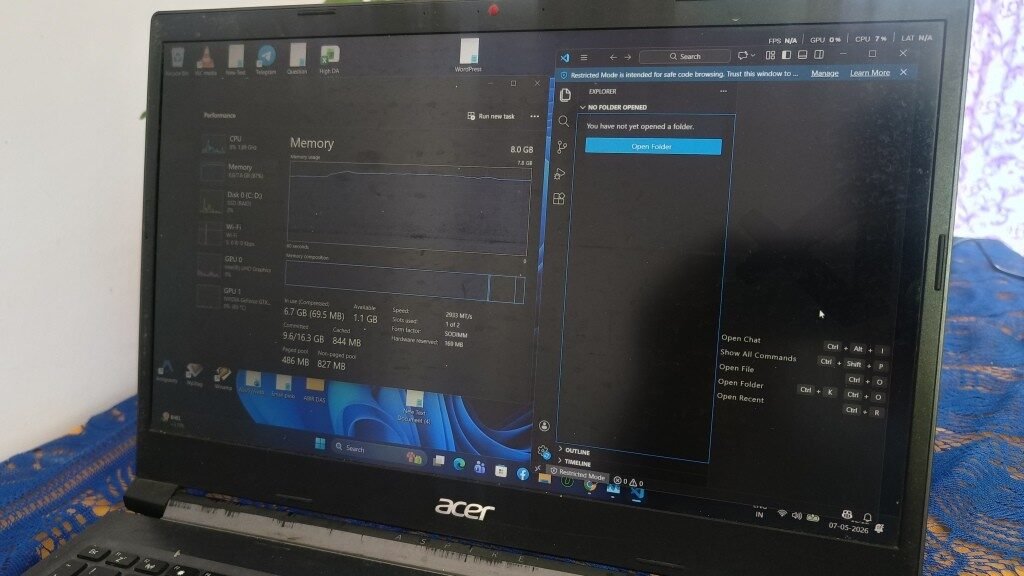
I did this testing on my own Acer laptop (8GB DDR4 2933MT/s, only single stick, 256GB NVMe SSD). I just run one simple Python script inside VS Code and keep Chrome open also — this is the same exact setup which most of the students and junior developers are actually using daily.


Before running any heavy thing, the system was already sitting on 86% memory usage (6.7GB out of 7.8GB), and that too with only Chrome, Brave and some Windows background services running. The moment I open and launch the Python file in VS Code, the memory jumped to 96% (7.5GB used, only 392MB is free) and the CPU also spiked up to 82%.
Chrome around 940MB (I had opened 24 tabs), VS Code approx. 919MB, Antimalware Service Executable close to 181MB, and on top of that Windows Explorer, Search and NVIDIA services.
How Much RAM Programming Actually Uses?
Before discussing whether 8GB is “enough” or not, you need to understand where your RAM is actually going. Most beginners think that coding itself is eating the memory. Actually it doesn’t. Your operating system, browser, and background processes are consuming much more RAM than your code editor will ever do.
We checked this on one HP Omnibook with 8GB RAM running Windows 11. With nothing opened — no browser, no VS Code, no apps at all — the Task Manager was already showing 3.4GB in use. That means 43% of your total RAM is gone, even before you start any work.
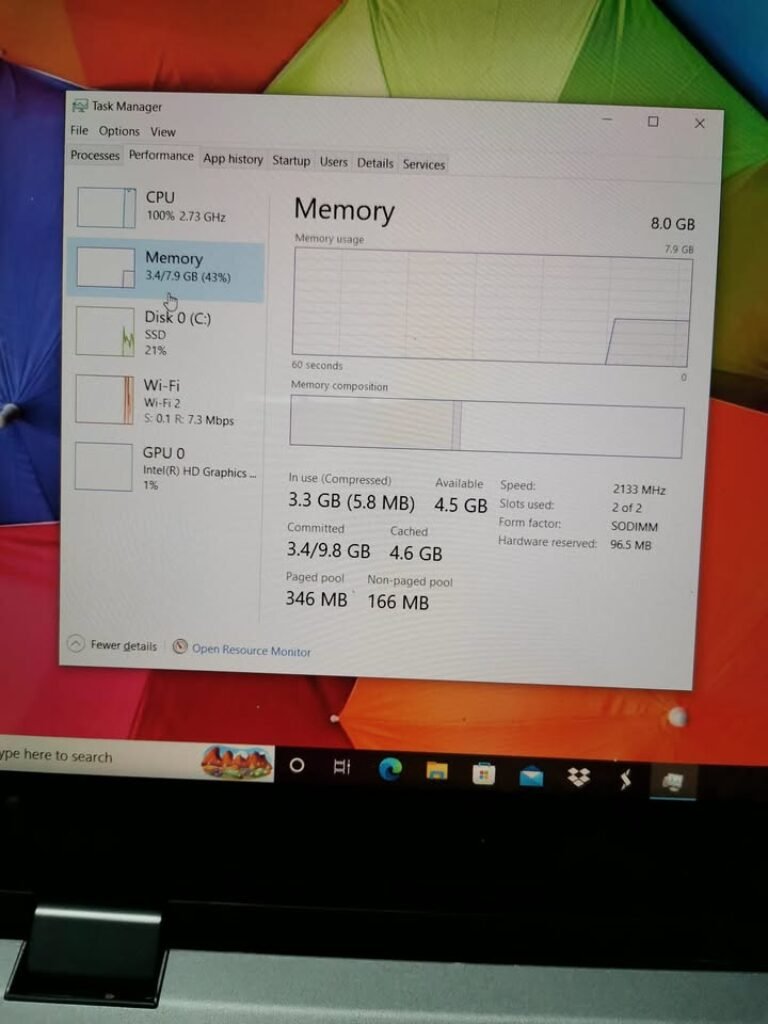
So only around 4.5GB is remaining for everything else — your code editor, browser tabs, terminal, and any dev server you want to run.
RAM Usage Breakdown — OS, Editor, Browser, Terminal
Typical consumption of each application, based on our testing:
| Application | Typical RAM Usage |
| Windows 11 (idle, no apps) | 3.4 – 4.0 GB |
| Ubuntu 22.04 / Linux Mint (idle) | 1.0 – 1.5 GB |
| macOS Sequoia (idle) | 2.5 – 3.0 GB |
| VS Code (3–4 extensions loaded) | 300 – 800 MB |
| Google Chrome (8–10 tabs) | 950 MB – 2.5 GB |
| Terminal / Command Prompt | 50 – 150 MB |
| Node.js dev server | 100 – 300 MB |
| Spotify (background) | 150 – 300 MB |
See the Chrome number carefully. With only 10 tabs open — Stack Overflow, MDN Docs, one YouTube tutorial, few Google searches — Chrome alone was eating 964.3MB on our test machine. VS Code was sitting at 339.4MB. Together with Windows, the system reached 85% RAM usage.
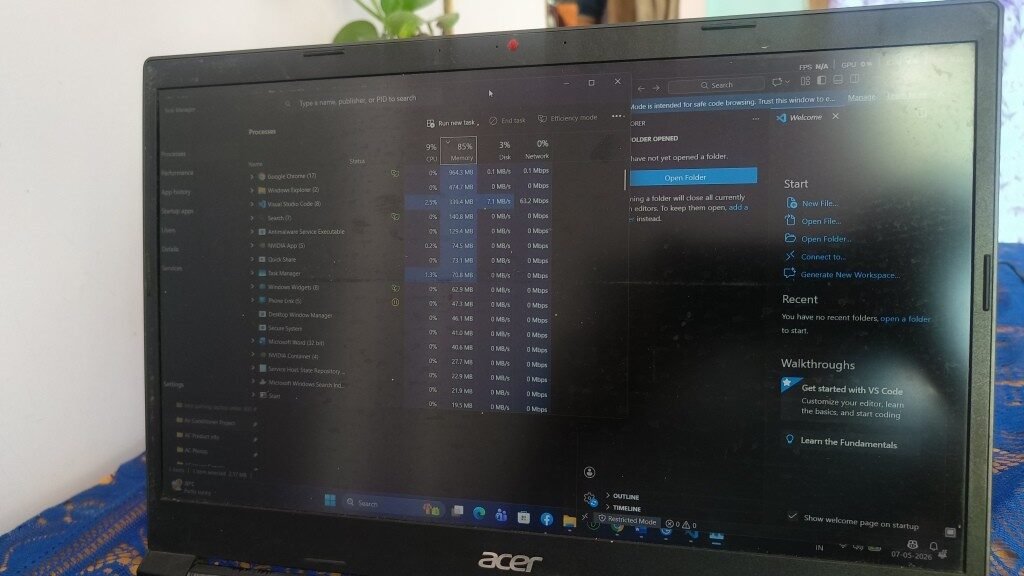
Welcome to 8GB on Windows. It is working, but you are always running on very thin margin.
8GB RAM vs. Common Programming Tasks — What is Working and What is Not
Programming tasks are not all the same thing. Writing one Python “Hello World” script is using almost no RAM at all. But running Android Studio with Pixel emulator can make a 8GB laptop go down on knees. We did testing of 8GB across the tasks which beginner programmer is actually facing — and results are varying more than what you can expect.
Web Development (HTML, CSS, JavaScript, React, Node.js)
Verdict: Comfortable in 8GB.
A typical web development setup — VS Code with Live Server extension, one browser showing your project, and maybe also a terminal which is running npm start — is sitting around 5–6GB total in Windows. Still you are having 2–3GB breathing space remaining.
Basic React or Vue.js projects, Express.js backends, vanilla JavaScript also — all of these are running without any problem. You will only start to feel the pressure on bigger projects which has heavy webpack/Vite builds that is spiking the memory temporarily at compilation time.
Bottom line: If your learning is web development, 8GB is genuinely okay. You will not hit any wall.
Python Programming and Scripting
Verdict: Very Comfortable in 8GB.
Python is one of most lightweight languages for running. The Python interpreter by itself is using only 50–100MB. Even after loading libraries such as NumPy and Pandas, one typical beginner script is staying well below 500MB.
Jupyter Notebook is adding another 200–400MB more, but still this is keeping you inside comfortable limit on 8GB. As long as your datasets are under 200–300MB size, you will not face any memory problems.
Where the breaking happens: loading 1GB+ CSV file inside Pandas. Pandas can take 3–5x of file size in memory while processing is happening. This is not 8GB-friendly scenario — but also it is not a beginner scenario also.
Java and Core CS Subjects (DSA, OOP)
Verdict: Comfortable in 8GB.
If you are B.Tech student who is solving DSA problems, making OOP projects, or doing your Java coursework — 8GB is handling it without any drama happening.
IntelliJ IDEA Community Edition is using around 1–1.5GB. Eclipse is more light at 700MB–1GB. Running basic Java programs, doing compile, debugging — none of these things is pushing 8GB to its limit.
The JVM is consuming more memory than Python or C++ for sure, but for the size of programs which you are writing in first two years of college, this is non-issue only.
Android App Development (Android Studio + Emulator)
Verdict: Struggling on 8GB.
Here is the place where 8GB is showing its ceiling. Android Studio is one of most heaviest IDE that is existing. On our testing machine, only opening of Android Studio — before doing any building or running of anything — was already pushing the RAM usage noticeably more high.
The real problem is coming from Android Emulator. It is reserving 2–3GB of RAM only for itself. Now you add Android Studio (1.5–2GB), Windows (3.5–4GB), and one browser for reading documentation (1–1.5GB), and you are looking at 8.5–11GB demand on a 8GB system.
What is the result? Heavy swapping is happening to the disk. System is becoming very sluggish. Gradle builds are taking forever time. The emulator is lagging badly.
Workaround: Use one physical Android phone which is connected through USB for testing in place of emulator. This one thing alone is saving 2–3GB and is making Android development workable in 8GB.
Data Science, Machine Learning, and AI
Verdict: Not recommending on 8GB.
When you are training even the basic ML models using scikit-learn, TensorFlow, or PyTorch, there is many things happening in background, the datasets is loading into memory, feature matrix is creating, and iterative computation is running again and again — all these operations is eating RAM very fastly.
One dataset which is only 500MB on the disk, it can easily becoming 2-3GB when loaded in memory (this surprised me also first time). Then you add the framework overhead also (TensorFlow by itself is taking 1-2GB sometimes), and your 8GB is already finished even before the model is starting to train.
If your goal is ML or data science, then 16GB is the minimum practical, no other option. For doing the serious works, 32GB is becoming the standard nowadays.
Docker, Virtual Machines, and DevOps Tools
Verdict: Very tight on 8GB.
A single Docker container which is running one basic Node.js or Python app, it uses around 300MB to 1GB. This much is manageable if it is alone. But the problem is, most of the real projects is needing multiple containers together — like your main app, then one database (PostgreSQL or MySQL), and maybe also Redis or Nginx on top.
When you run 2-3 containers together with your code editor and browser also opened, on Windows it is crossing the 8GB very easily. Virtual machines is even more worse — if you give only 2GB to one VM, your host OS is left gasping for the memory.
Workaround: Better you use WSL2 (Windows Subsystem for Linux) in place of the full VM. It is much more memory-efficient and for most of the DevOps learning scenarios, it is handling things properly on 8GB only.
Quick Reference: Task Verdict Table
| Programming Task | 8GB Enough? | Comfort Level |
| Web Dev (HTML/CSS/JS/React) | Yes | Comfortable |
| Python Scripting & Learning | Yes | Very Comfortable |
| Java / DSA / OOP Coursework | Yes | Comfortable |
| Android Studio + Emulator | Barely | Struggles |
| ML / Data Science / AI | No | Not Recommended |
| Docker / VMs / DevOps | Barely | Very Tight |
What Does Using 8GB RAM for Coding Actually Feel Like?
The numbers in table is one thing. But the daily real experience is totally another thing.
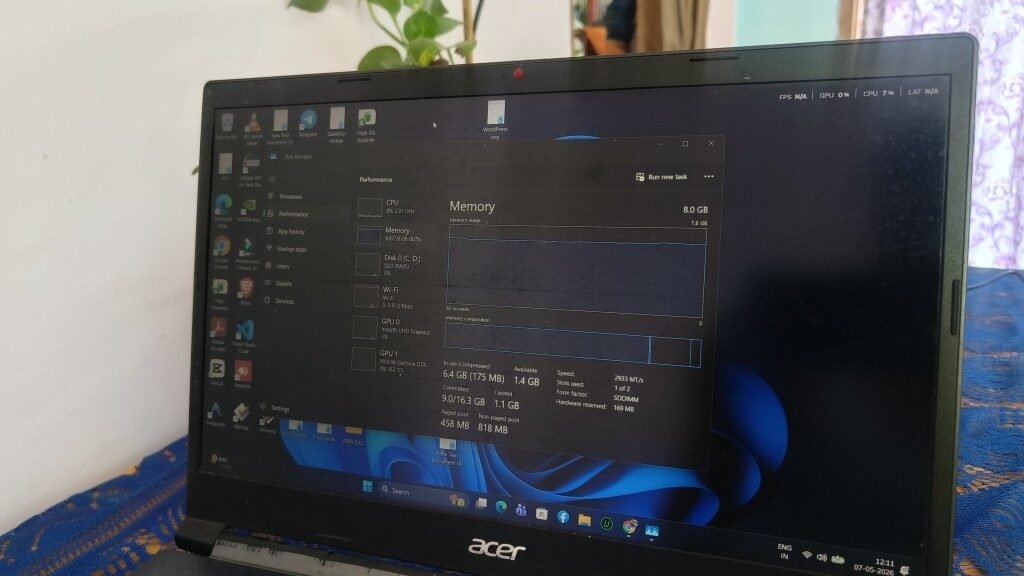
We did one normal beginner coding session on Acer laptop having 8GB RAM with Windows 11 — VS Code is opened with a Python project, Google Chrome running with 10 tabs (Stack Overflow, some documentation pages, one YouTube tutorial), and also Windows terminal. No Spotify running. No Discord also. Just only coding.
The RAM usage? It went to 6.4GB. That means 82% is already eaten. Only 1.4GB is left for free. The laptop was not frozen. It was not unusable also. But every time when we switch from Chrome to VS Code, there is one half-second pause coming — the type which you don’t feel one time, but after one hour you start to get irritated.
In one another session, just only opening VS Code made the memory jump to 6.7GB out of 8GB — leaving hardly 1.3GB headroom before the system touch its ceiling limit.
And what happen when you hit that ceiling? Windows then start using the page file — which is one part of your SSD or HDD that work like extra RAM (overflow type). Your laptop will not crash, but everything become slow slow. Apps will take some more time to respond back. Chrome tabs are reloading again when you come back to them. You will definitely notice this thing.
Honest opinion: 8GB on Windows 11 is workable, but not luxury type. You will learn to close those tabs which you are not using. You will skip Spotify while doing coding. You will make habit of closing the unnecessary background apps. It is one type of discipline that 16GB users never have to think about — but still, it is not stopping you from learning the coding.
8GB vs 16GB RAM for Programming — Is It Really Worth Spending ₹3,000–5,000 More?
This is the real question behind the question. Most people who searching about this are not only curious about 8GB, they are actually trying to decide should they pay little more money or not.
Where You Will Not See Any Difference
For doing basic coding works, 8GB and 16GB feeling almost the same, no big change:
- Writing Python scripts or small C++ programs
- Solving questions on LeetCode or Codeforces platform
- Running one single Node.js project with some few browser tabs open
- Doing basic Java or C programming college assignments
If these things are all what you planning to do for next one year, then 16GB will not make your code compile any faster or your program run any better. The difference is simply not visible to eyes.
Where 16GB Clearly Going Ahead
We did one test of same workload, Chrome with 10 tabs plus VS Code, on a 16GB laptop. What was the result? Only 7.4GB is used. That is 47% of total RAM. More than half memory is still sitting free.
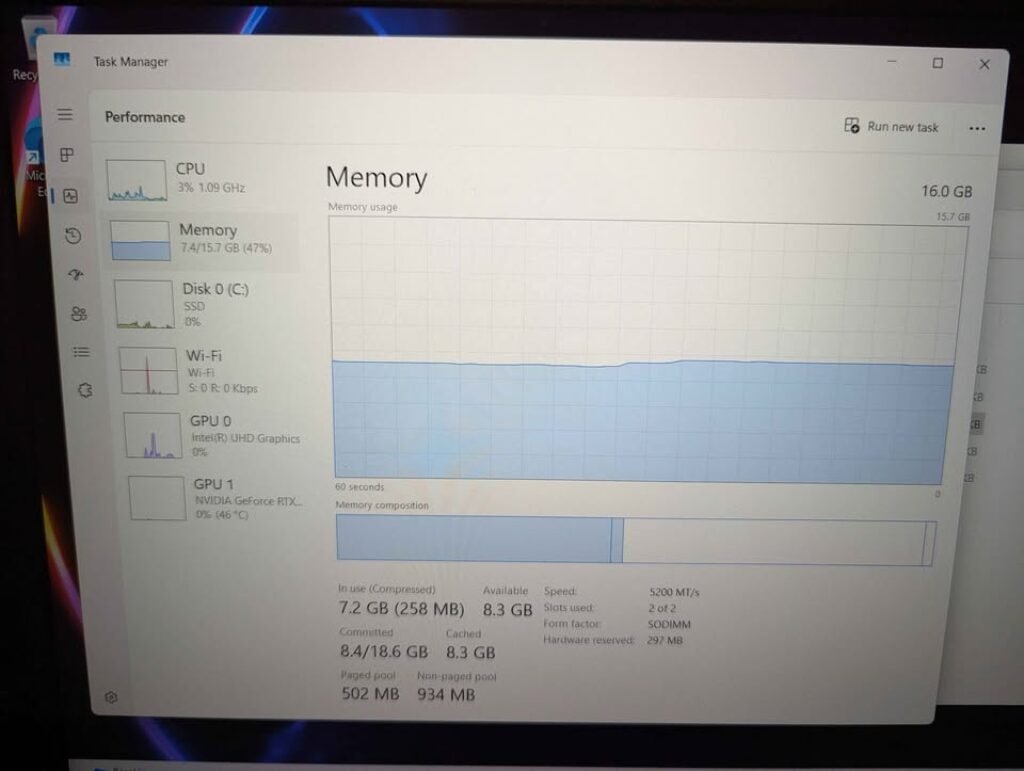
Now compare this with 8GB laptop which is running same apps at around 82–85%. The gap is very much obvious. On 16GB machine, you can easily:
- Run Android Studio with Emulator without any swapping problem
- Open 20–30 browser tabs and still no slowdown is happening
- Run Docker containers side by side with your editor
- Attend one Zoom or Teams call while doing coding (this is very common thing in internships and team projects nowadays)
- Work on larger datasets in Python without struggle
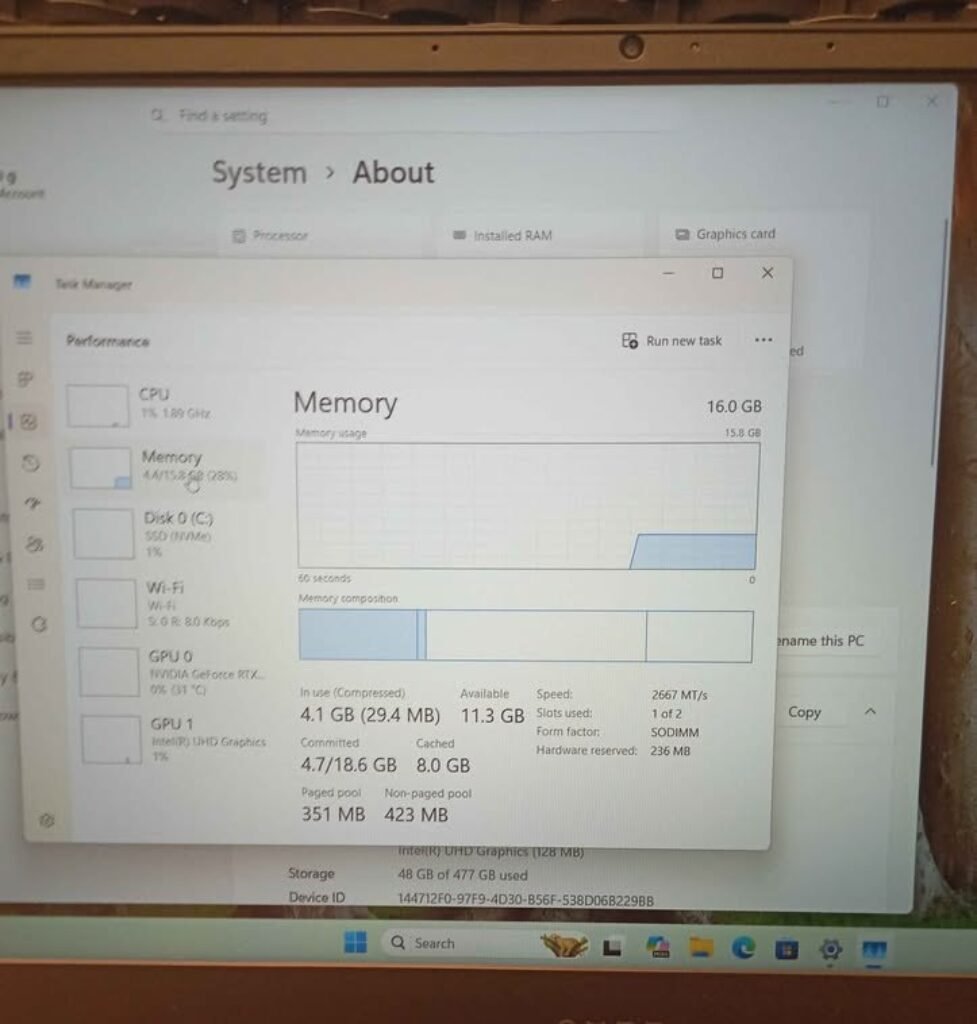
Even when laptop is sitting idle, 16GB is breathing more easily. One 16GB Windows 11 system at rest is using around 4.1GB only, which is just 26% of total memory. Almost 12GB is sitting free, waiting for your actual work to come.
Does Your Operating System Affect How Much RAM You Need for Coding?
More than the most people are realizing it. The same 8GB hardware is performing very different depending on which OS is running inside it.
Windows 11 — The Most Heavy Baseline
Windows 11 is the most hungry mainstream OS in market. At idle only, it eats around 3.4–4GB because of background services running silently — Windows Defender, search indexing, telemetry, Windows Update checking, and many other system process.
In a 8GB system, this means Windows is taking almost half of your RAM before you even open one single app. After that, every browser tab, every extension, every dev tool is fighting with each other for the remaining 4–4.5GB only.
If you are stuck on Windows with 8GB RAM, then disable the unnecessary startup programs, turn off background apps from Settings, and try to use Edge (it takes little less RAM than Chrome) or Firefox.
Linux (Ubuntu, Fedora, Mint) — The 8GB Sweet Spot
In Linux, 8GB is starting to feel generous actually. Ubuntu or Linux Mint at idle is consuming only 1–1.5GB — which is giving you around 6.5–7GB free memory for the coding work.
The same setup which is pushing Windows till 85% usage, might be sitting only at 50–60% in Linux. You are getting same VS Code, same Chrome/Firefox, same terminal — but with much more breathing space.
If you already have one 8GB laptop and feeling it slow, then switching to Linux (or doing dual-boot) is the single best free upgrade which you can do. Some popular beginner-friendly options are: Linux Mint, Zorin OS, Ubuntu.
macOS — Efficient but Locked with Apple Hardware Only
Apple’s M-series chips are using a unified memory architecture along with aggressive swap compression. Because of this, one 8GB MacBook Air is handling coding noticeably better than a same 8GB Windows laptop.
But there is one catch also — RAM is soldered in every modern Mac nowadays. No upgrade is possible later. If you are buying 8GB, then you are locked with 8GB for forever. And Apple is charging ₹20,000+ extra for stepping up to 16GB at the time of purchasing only.
For programming purpose? A 8GB M-series Mac is surprisingly capable one. But if you can afford that 16GB upgrade, then please take it — because later you cannot add it.
7 Useful Tips for Get Maximum from 8GB RAM in Programming
Already you have a 8GB laptop? No problem. These small changes will help you squeeze out more performance from what you having now.
1. Use VS Code, Not IntelliJ or Android Studio (If Possible)
VS Code only take around 300–400MB with some few extensions installed. But IntelliJ takes near 1–1.5GB, and Android Studio is even more hungry, almost 1.5–2GB or sometimes more. For doing Python, JavaScript, C/C++, or web development works, VS Code give you mostly same features but in much less memory cost.
2. Change Chrome to Firefox or Brave
Chrome is one big RAM eater, specially when you opening 10+ tabs at same time. Firefox use about 20–30% less memory in same type of work. Brave is also more lighter than both. Just by doing this one switch only, you can save almost 300–500MB easily.
3. Close The Apps Which You Not Using
Discord is taking 300–400MB. Spotify around 150–300MB. Telegram Desktop also 150–250MB. All these things adding up very fast in background. If you sitting for serious coding session, better close them. Your 8GB RAM will be thankful to you.
4. Disable Startup Programs Which Is Not Needed
Just open Task Manager, then go to Startup tab, and disable all the things which is not important. Many laptops are coming with manufacturer’s bloatware pre-installed, and these things silently running from startup and eating your RAM without telling.
5. Make Sure Your Laptop Has SSD, Not HDD
Actually this one is not exactly a RAM tip, but more like a “make your 8GB feel bigger” tip. When the system is running out of RAM, it start swapping data into the disk. If you are having SSD, this swap thing happen so fast that you almost not feeling it. But on a HDD, oh my god, it become really painful and slow.
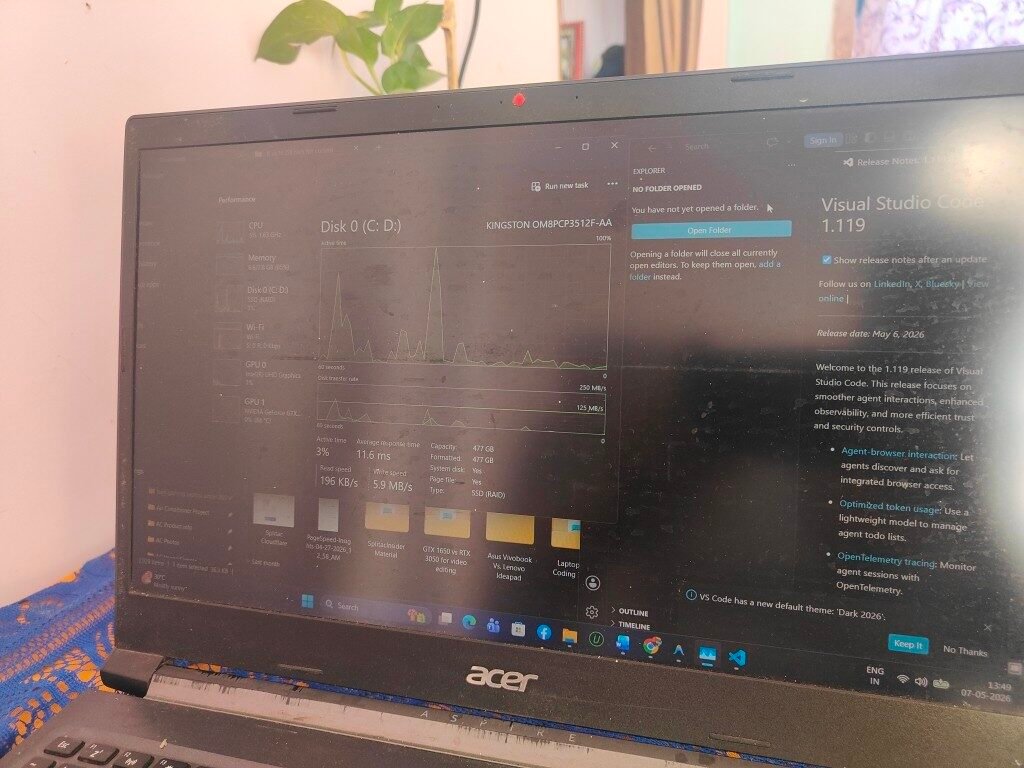
We notice this one time during VS Code launching — the NVMe SSD went to 100% active time for a small moment, because it was handling sudden burst of swap and loading files, but then it come back to idle quickly. Same situation in HDD will become a 10–15 second freeze for sure.
6. Try Dual-Boot Linux With Windows
You can keep the Windows for normal daily things. But for coding work, use Linux side. By doing this, you instantly getting back almost 2–3GB RAM, because Windows have lots of background overhead which Linux is not having. Setting up dual-boot with Ubuntu or Linux Mint is taking only 30 minutes around, and lot of guides are there online for help.
7. Use Real Phone for Android Development
Better you fully skip the Android Emulator. Just take your phone, plug in USB cable, then go to Developer Options and turn on USB Debugging, after that you can deploy your apps directly into the device. This trick is saving 2–3GB of RAM, and actually it running more faster than emulator on 8GB system.
Can You Upgrade The Laptop RAM in Future?
If you planning to buy 8GB laptop right now and thinking to upgrade it later, please check this thing first — because all laptops are not allowing the RAM upgrade option.
Which Programming Languages is Best Running on 8GB RAM?
Beside the work you doing, the language you pick and the tools also make difference how much RAM is needed. Some ecosystem is more lighter by nature than others one.
| Tier | Languages / Tools | RAM Comfort on 8GB |
| Very Comfortable | Python, C, C++, HTML/CSS/JS, Go, Rust, Lua | Runs great — lightweight compilers and interpreters |
| Comfortable | Java, Kotlin (without Android Studio), PHP, Ruby, Node.js | JVM and runtimes use more, but still within limits |
| Tight | C# (.NET), Flutter, Swift (Xcode) | Heavier IDEs and build tools — workable with discipline |
| Struggles | Android Studio + Emulator, TensorFlow/PyTorch, Docker-heavy stacks | 16GB recommended for any regular use |
For almost 90% things which a B.Tech 1st or 2nd year student is facing — like Python, C, C++, Java, and web stuffs — the 8GB is handling these languages and tools without much problem.
One thing that maybe surprise you: the CPU is not doing much hard work when you doing normal coding. In our testing laptop, the Intel Core i5-10300H was sitting only at 3% usage while VS Code is running. Coding is mostly a memory-bound type work, it is not CPU-bound one.
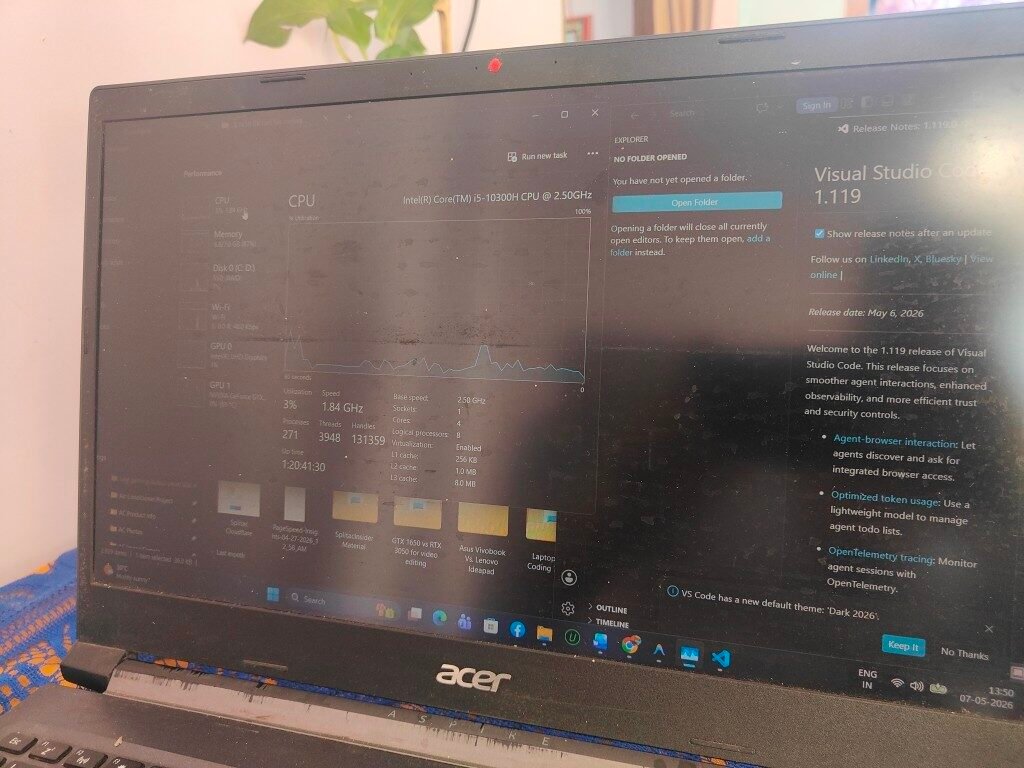
So the real bottleneck here is RAM, not the processor you have. When you going to buy one laptop for programming purpose, you should give more priority to RAM and SSD first, rather than putting money on a powerful CPU.
Should You Buy 8GB Laptop or Save Money for 16GB? — Our Suggestion
After we testing on many laptops and different type of works, this is what we want to recommend you:
Buy 8GB With Confidence If:
- You are learning Python, web development, C/C++, or doing your B.Tech college work
- Your budget is below ₹35,000 and going for 16GB means you have to compromise on SSD or the build quality of laptop. Screen size matters too — read 14-Inch Vs 16-Inch Laptop
- Your laptop is having one extra RAM slot for upgrade (later you can put 8GB more for only ₹1,500–2,500)
- You are okay to use Linux, or you can manage background apps in Windows properly
Try to Stretch for 16GB If:
- In coming one year, you are planning to learn Android development, data science, or DevOps type field
- The price gap is less than ₹5,000 only when comparing with 8GB version
- Your laptop is having soldered RAM (means no chance of upgrade in future)
- You do heavy multitasking like coding + video call + many browser tabs all at same time
Don’t Think Too Much If:
- You already have one 8GB laptop with you. Just start the learning now itself. Install VS Code, choose any one language, and write your first program today only
- You are waiting for that “perfect” laptop before starting anything. But actually no such thing is existing. The best laptop for programming is the laptop which you already having in your hand
If you are still deciding which machine to pick, our Top Laptops for Coding and Programming Under ₹70000 covers the top options.
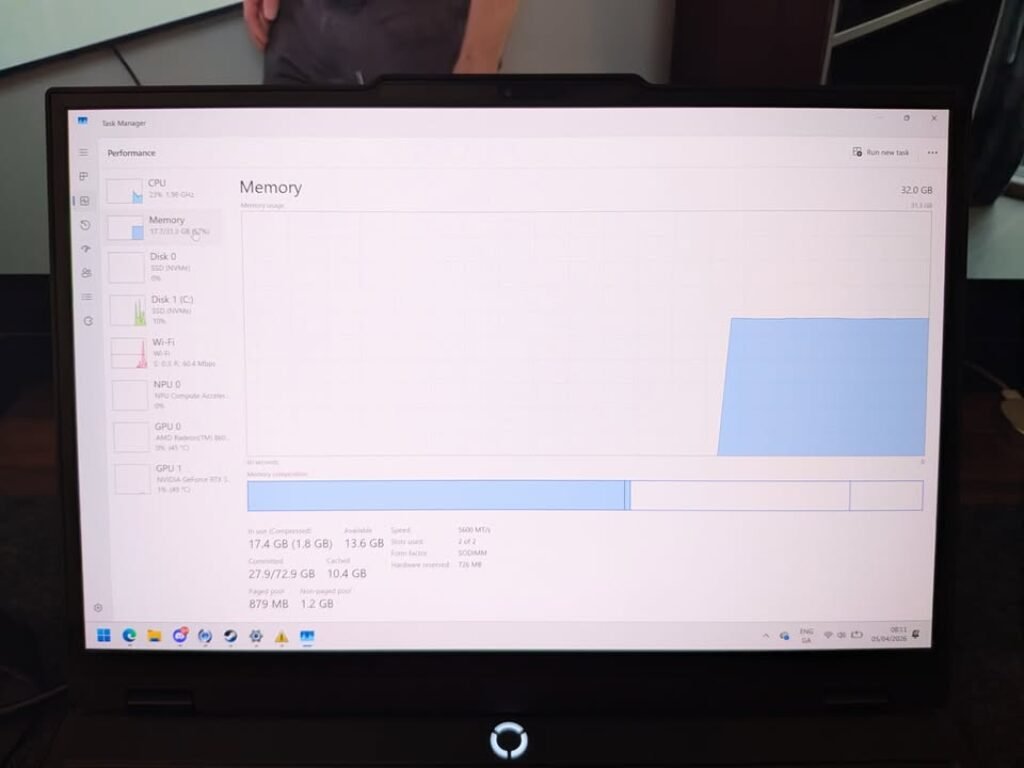
For giving you some perspective — on one 32GB system, when Chrome and VS Code was running, the memory usage was sitting around 17.4GB, with two 16GB SODIMM sticks running on 5600 MT/s speed (we also covered DDR5 4800MHz vs 5600MHz in Laptop for Gaming). So much headroom is there, but also it is too much overkill for one beginner person. You don’t need 32GB actually. Even 16GB also you probably don’t need as of now.
8GB will not stop you in your first year of programming journey. Your consistency is going to matter 100 times more than the RAM size.
Frequently Asked Questions
Yes, definitely. The Python interpreter only takes around 50–100MB of memory. When you open VS Code with a browser also, the total usage stay around 5–6GB on Windows machine. For learning Python, doing problem solving, making scripts and working on small to medium datasets, 8GB is more then enough actually.
Technically yes you can, but practically it become very painful experience. Android Studio with the emulator together demands almost 4–5GB of RAM. On a 8GB Windows laptop, the total memory usage goes beyond what is available, so system start lagging. Better option is to use a real phone for testing your app instead of running emulator, the experience become much smoother this way.
More then enough actually. Competitive programming is mostly about running small, well optimized programs in C++, Java or Python language. These programs use very less RAM. Your code editor, one browser with contest page open and a terminal window, all together is around 4–5GB only. So 8GB handle competitive programming without any sweat.
For most of the coding tasks, yes it does. We have observed one Intel Core i5-10300H processor sitting at only 3% CPU usage during a normal VS Code session, but at the same time RAM was sitting at 82–85% usage. Programming is mostly a memory-bound activity, not CPU bound. So you should give priority to RAM and SSD first, then think about a powerful processor when buying a laptop.